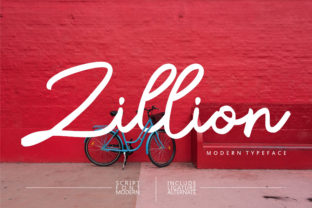
Zillion: A Handwritten Font That Fits Real Workflows
Zillion isn’t just another script font—it’s a tool shaped by intention. Designed to feel human, not algorithmic, Zillion delivers crisp legibility with organic rhythm and subtle variation in stroke weight and spacing. Its authenticity comes from careful observation of natural handwriting—not mimicry, but distillation. That makes it especially useful for people who need visual warmth without sacrificing clarity: educators preparing lesson materials, freelancers designing client presentations, small business owners crafting brand assets, or bloggers adding personality to digital content.
Where Zillion Fits in Your Process
Fonts don’t exist in isolation. They’re part of a chain: idea → structure → expression → delivery → response. Zillion enters most naturally at the expression stage—but its value extends before and after that moment. Before a project begins, selecting Zillion signals a deliberate choice about tone. If your goal is approachability, sincerity, or thoughtful craftsmanship—rather than corporate neutrality or high-tech precision—Zillion becomes an early alignment check. It helps you ask: *Does this project benefit from visible human effort?* If yes, Zillion supports that intent from the first wireframe or mood board.
During execution, Zillion works best where hierarchy and readability coexist with character. It’s not ideal for dense body text or data tables, but shines in headings, callouts, handwritten-style annotations, quote blocks, and short-form branding elements like logos, social banners, or email headers. Because it’s well-spaced and carefully kerned, it holds up across sizes—from 16px captions on mobile to 96px hero text on landing pages—without losing its grounded, hand-drawn integrity.
Integration Without Friction
Zillion is built for compatibility. It includes full Latin character sets, standard punctuation, numerals, and OpenType features like contextual alternates and ligatures—so it behaves predictably in design tools (Figma, Adobe Creative Cloud, Sketch), web environments (via variable font files or WOFF2), and even document editors (when embedded as a system font). No special plugins or workarounds are needed. That means less time troubleshooting rendering inconsistencies and more time focusing on message and layout.
It pairs cleanly with neutral sans-serifs (like Inter, Helvetica Neue, or IBM Plex Sans) and structured serifs (such as Merriweather or Lora). The contrast between Zillion’s fluidity and a clean supporting typeface creates visual breathing room—ideal for presentations where you want slides to feel curated, not cluttered. In editorial layouts, using Zillion for pull quotes while keeping body text in a highly legible serif reinforces voice without competing for attention.
Real-World Workflow Examples
- Educators: Use Zillion for weekly learning objectives or reflection prompts in Google Slides or Canva. Its warmth lowers cognitive load for students reviewing material—especially in remote or hybrid settings where personal connection is harder to convey.
- Freelancers: Embed Zillion in proposal PDFs for section headers and signature lines. It subtly communicates care and individuality—differentiating your offer from templated competitors—without undermining professionalism.
- Small Business Owners: Apply Zillion to limited-edition product labels, workshop handouts, or “thank you” notes included with orders. Its tactile quality reinforces handmade or locally made positioning—and scales reliably from print to Instagram story text overlays.
- Bloggers & Content Creators: Drop Zillion into Notion or Obsidian as a custom heading style for personal knowledge bases. When used sparingly—for key insights, recurring mantras, or milestone reflections—it adds visual rhythm to long-form notes without disrupting scanability.
Preparation Matters—Here’s How to Start Right
Before dropping Zillion into a live file, test three things: contrast, context, and consistency. First, verify color contrast against your background (tools like WebAIM’s Contrast Checker help). Zillion’s thin strokes can fade if paired with low-contrast grays or busy textures. Second, preview how it reads alongside your primary typeface—especially at smaller sizes. A headline in Zillion may look perfect at 48px, but shrink it to 24px for a mobile menu and reassess spacing and letterfit. Third, define usage rules early: Will Zillion appear only in headings? Only for emphasis? Only in illustrations? Clear boundaries prevent visual fatigue and maintain brand coherence over time.
Also consider fallback behavior. On the web, declare Zillion as the first choice in your font stack, then follow with system fonts that share its x-height and rhythm (e.g., "Zillion", "Segoe Script", "Apple Chancery", cursive). This ensures graceful degradation if the font fails to load—preserving hierarchy and intent, even when the exact aesthetic shifts slightly.
Efficiency Through Intentional Restraint
Zillion gains strength through selective use. Overuse dilutes its impact and risks legibility issues in longer passages. Think of it like a highlighter: effective when applied to critical phrases, ineffective when underlining every sentence. In practice, that means limiting Zillion to no more than two typographic roles per project—e.g., main headlines + signature block—or restricting it to one channel entirely (e.g., all email subject lines, but nowhere else).
This restraint also supports long-term usability. As your brand evolves or your content volume grows, having clear guardrails around Zillion’s application prevents drift. You’ll know instantly whether a new banner, slide deck, or packaging mockup aligns with your established visual language—because the rule is simple, observable, and tied to purpose, not preference.
Quality Control Starts With Output
Because Zillion mimics handwriting, minor inconsistencies in rendering—especially across browsers or devices—can stand out more than they would with a geometric sans-serif. Always export and review final assets in their intended environment: open a PDF on a tablet, view a webpage on iOS Safari, scroll a Notion page on Chrome. Look specifically for uneven baseline alignment, clipped descenders (like the tail of “g” or “y”), or unintended ligature breaks. These aren’t flaws in Zillion—they’re reminders that handwritten aesthetics require extra attention at the delivery stage.
If you’re printing, confirm your printer supports OpenType features and embeds fonts properly. For web use, serve Zillion as a compressed WOFF2 file and preload critical instances (like logo text) to avoid flash-of-unstyled-text (FOIT). These steps take minutes but significantly improve perceived polish—especially for audiences who notice craft, even if they can’t name why.
Building Consistency Over Time
Consistency with Zillion isn’t about repetition—it’s about recurrence with reason. Keep a lightweight style guide snippet: a screenshot of approved pairings, a note on minimum size thresholds, and examples of what *not* to do (e.g., “Don’t stretch Zillion horizontally,” “Don’t use over photographic backgrounds without solid backing”). Store it where your team or future self will actually find it—inside your Figma library, pinned in Slack, or as a comment in your CSS file.
Over months or years, revisit how Zillion functions in your work. Does it still reflect your current voice? Has its usage drifted into areas where clarity suffers? Small course corrections—like switching from Zillion to a bolder script for accessibility, or retiring it from email footers in favor of a more screen-friendly option—are signs of thoughtful stewardship, not inconsistency.
Zillion endures because it serves a real need: the desire to communicate with presence, not just precision. It doesn’t automate personality—it invites you to bring yours forward, deliberately and clearly. Used with awareness of process, compatibility, and audience, it becomes more than typography. It becomes part of how you show up—consistently, authentically, and ready for real work.