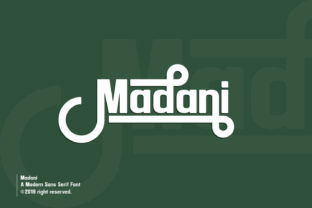
Madani: Clean, Confident, and Surprisingly Flexible
If you’ve ever scrolled through a font marketplace and paused at Madani, you’re not alone. Its striking sans serif letters—sharp yet approachable, modern without feeling cold—stand out in a crowded field. Designers reach for Madani when they need clarity and presence: think bold headlines on a startup landing page, clean product labels for a sustainable brand, or elegant slide decks for educators and consultants. But here’s what many overlook: Madani isn’t just *pretty*. It’s a working tool—and like any tool, its real value emerges only when used with intention.
What Madani Actually Is (and What It Isn’t)
Madani is a contemporary sans serif typeface designed with strong geometric foundations and subtle humanist touches—notice how the lowercase a and g retain gentle curves, while capitals hold crisp, confident angles. It includes multiple weights (Light to Bold), true italics—not slanted romans—and full language support for Latin-based scripts. Importantly, Madani is not a variable font, nor does it include stylistic alternates or decorative variants. That’s not a flaw—it’s focus. Trying to force Madani into roles it wasn’t built for (like dense body text at 10pt or expressive handwritten headers) leads to frustration, not flair.
Mistake #1: Assuming “Modern” Means “Universal”
Many download Madani expecting it to work seamlessly across every context—web, print, apps, social graphics—without adjusting settings. In practice, Madani shines brightest at medium-to-large sizes (16px and up for web, 14pt+ for print). At small sizes or low-resolution screens, its tight letter spacing and refined terminals can blur or tighten visually. A designer once used Madani for mobile app navigation labels at 12px—readers tapped the wrong menu item three times before switching fonts.
Better approach: Test Madani in your actual environment. For web, preview it using real device emulation in Chrome DevTools. For print, output a physical proof at final size. If legibility falters below 14px, pair Madani with a highly legible companion (like Inter or Source Sans Pro) for body copy—don’t stretch it beyond its natural range.
Mistake #2: Overlooking Licensing Nuances
Madani is available under both free and commercial licenses—but the free version often lacks Bold or Italic weights, and may exclude web font hosting or use in SaaS products. One freelancer embedded the free Madani files directly into a client’s WordPress theme, only to receive a compliance notice months later because the license didn’t cover self-hosted web use.
Better approach: Always check the license *before* downloading—even if it says “free.” Look specifically for permissions around: (1) number of domains or installations, (2) whether web fonts are included (not just desktop), (3) redistribution rights (e.g., in templates you sell), and (4) attribution requirements. When in doubt, buy the full commercial license. It’s rarely more than $30–$50 and saves time, stress, and potential legal friction.
Mistake #3: Ignoring Kerning and Spacing in Real Layouts
Madani’s default letter spacing looks balanced in specimen sheets—but real-world text behaves differently. Headlines with all-caps or tight acronyms (e.g., “UI/UX STRATEGY”) can feel cramped; long words with repeating characters (“bookkeeping”, “freelancing”) may show uneven rhythm. Auto-kerning in design tools often misses these subtleties.
Better approach: Manually adjust tracking for display text—especially in logos, banners, or hero sections. In Figma or Adobe apps, select headline text and increase tracking by +10–+25 units (not percent). For web, use CSS letter-spacing sparingly: letter-spacing: 0.02em; works well for headings; avoid applying it globally. And never override Madani’s built-in kerning pairs unless you’re correcting a specific collision—those were carefully crafted.
What to Check Before You Commit
- Weight availability: Does your project need Light for delicate captions? Bold for impact? Confirm which weights ship with your license—some bundles omit Light or ExtraBold.
- Language coverage: Madani supports Western, Central, and South European languages well—but doesn’t include Cyrillic, Arabic, or extended Vietnamese diacritics. If your audience uses those, verify compatibility early.
- Web performance: Madani’s WOFF2 files are lean (~80–120KB per weight), but loading four weights plus italics adds up. Use
font-display: swap;and considerpreloadonly for your primary heading weight. - Design system fit: Does Madani complement your existing color palette and UI components? Try setting a sample paragraph in your real interface—not just in a blank artboard. Contrast, hierarchy, and whitespace shift everything.
A Smarter Way to Start Using Madani
Instead of jumping straight into branding or full-site rollout, begin with one high-impact, low-risk application: your email signature, a single presentation template, or your portfolio’s “About” section. This gives you room to observe how Madani interacts with your voice, your audience’s expectations, and your tools—without pressure. Notice how readers respond. Do they comment on clarity? Do forms feel more trustworthy? Does your team find it easier to stay consistent?
Remember: typography isn’t about trend-chasing. It’s about removing friction between your message and the person reading it. Madani excels there—not because it’s flashy, but because it’s honest, legible, and quietly confident. When you choose it deliberately—not just because it looks “modern”—you align visual tone with purpose. That’s where real design leverage begins.
So go ahead and download Madani. Then pause. Test it. Tweak it. Trust your eyes—and your users’ experience—more than any specimen sheet. That’s how versatile fonts earn their place, not just in your library, but in your work.